
Set Environment Variables
The next step is to set up the PATH environment variable so that Eclipse IDE can access Cygwin commands
To set environment variables follow these steps:
- Find "My Computer" icon either on the desktop or in the start menu, right-click on it and select Properties item from the menu.
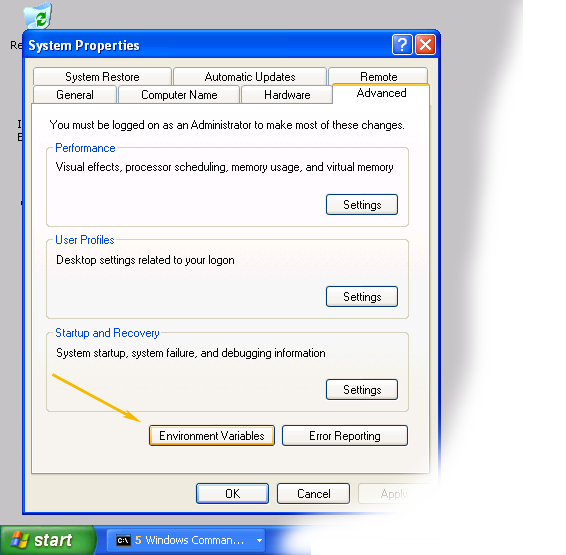
- When you see the Properties dialog box, click on the Environment Variables button as shown below
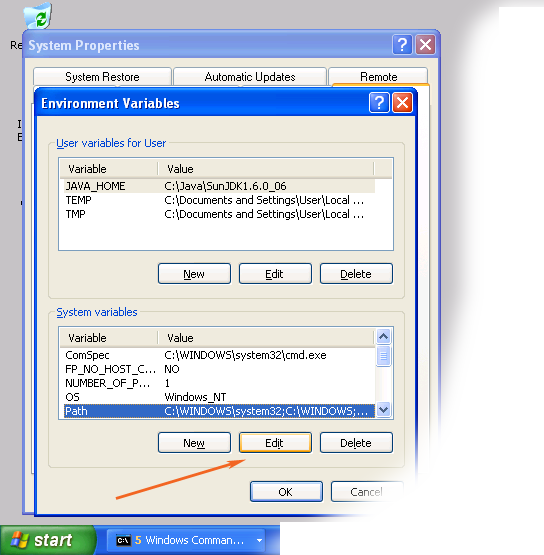
- When Environment Variables dialog shows up, click on the Path variable located in the System Variables box and then click the Edit button.
- When Edit dialog appears append the following text to the end of the Variable value field:
;c:\cygwin\bin;c:\cygwin\usr\bin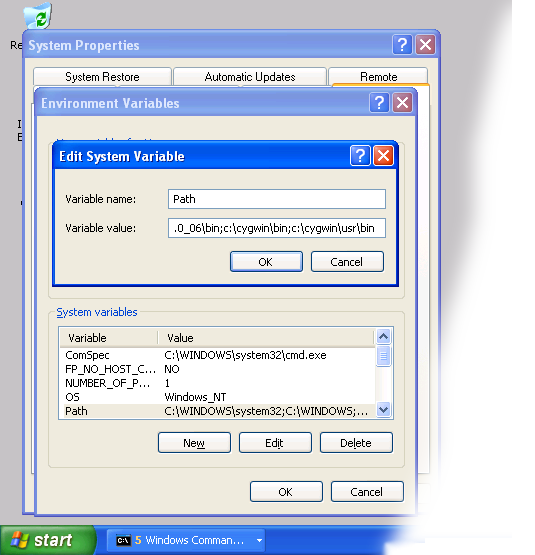 Note: If you installed cygwin in the non-standard location, correct the above value accordingly.
 - Close all three dialog boxes by pressing OK button of each dialog box.


No comments:
Post a Comment
Please feel free to contact or comment the article