Showing posts with label internet. Show all posts

Tuesday, June 12, 2012

Android ICS already offers more than what is coming in iOS 6

Apple officially announced iOS 6 yesterday and while it is a welcome update for iOS that I look forward to installing on my iPad 3, most everything Apple revealed can already be done today on Ice Cream Sandwich Android devices.

Apple does a good job of taking existing technology and features and making it more user friendly (they did it with iOS 5 last year), but ICS took Android a long ways and the experience on the HTC One X is fantastic.

Apple stated there are over 200 new features in iOS 6 and we will have to wait until the fall to see everything. Developers will be loading up beta versions soon so we will see some more discussions on features over the next few weeks and months.

They did reveal several major features and functions at WWDC, so let's take a look and compare them to what we see with existing Android ICS. You can check out the table below that summarizes the differences, followed by more lengthy discussion and my opinions. Don't forget that Google revealed ICS last year and is likely to show off Jelly Bean this month at Google I/O.

Apple iOS 6 Android Ice Cream Sandwich
Maps Turn-by-turn, 3D Turn-by-turn, walking/biking/transit, 3D, offline coming
Voice control Siri Google Voice Actions, S-Voice on SGSIII
Travel and reward card management Passbook 3rd party apps
Email Unique account signatures, limited attachment support, VIP filtering Unique account signatures, complete attachment support, VIP filtering, full Gmail client
Service sharing Facebook and Twitter Virtually all cloud and social services
Notifications Reply with text, Do Not Disturb, Shade Reply with text, Do Not Disturb (3rd party), Shade, premium experience
Video calling 3G & WiFi FaceTime, Skype, Tango others Google Talk, Skype, Tango, others
Video stabilization Yes Yes

Maps: Apple has always included a Maps application, based on Google Maps. As we discussed in May, Apple has decided to finally put some effort into navigation (powered by TomTom) and will be rolling out their own mapping solution in iOS 6.

In typical Apple fashion, the application has lots of attractive visuals with good functionality. It is their first attempt so there is still work to be done, but the new Maps does provide for turn-by-turn navigation, traffic monitoring (crowd-sourced like Waze), location-based integration in apps, and some great lock screen capability.

There doesn't appear to be any offline navigation support, which is something that Google justrecently announced for Android devices.

It also appears iOS owners will lose bicycle, pedestrian, and transit functions seen in Google Maps on iOS 5. Google Maps Navigation is a tried and tested service and application that will be tough to beat.

Siri: Siri looks to finally be getting some functionality that it should have had at launch, including the ability to launch apps, real-time sports, movie, and restaurant information and integration, and support from auto manufacturers for true eyes-free usage.

As a sports fan, I liked the demos at WWDC. Then again, I follow the sports I enjoy most with dedicated apps anyway so it isn't as critical as it was made out to be. These functions are great to see in Siri, but I wonder how many people will use it past the week or two novelty period. I only used Siri on my iPhone 4S for reminders after the novelty wore off and rarely see people talking to their phone so am still not yet sold on the practicality of Siri.

Passbook: Passbook looks like it takes the best from multiple 3rd party apps like TripIt, Starbucks, Flixster, and more to provide one location for storing airline info, store reward cards and more. It is not a payment system application, but seems like it could move that way in the future.

Mail enhancements: I almost fell on the floor laughing when I saw how excited people were about multiple email signatures coming to iOS. You can now have a different signature for each email account on your iOS device, WOW :)

You can also now finally add attachments from within the email client rather than having to go to the Photos app and then create an email. However, attachment support is still extremely limited due to Apple's closed approach to the file system. You can attach just photos and only one at a time.

iOS 6 will also include a VIP mailbox so you can filter people's email that you really want to see. One thing I love about HTC Sense is this same ability to have groups that let you quickly filter your email with the touch of a tab. Again, nothing new or groundbreaking for Android, but nice to see Apple catching up.

Facebook: iOS 5 brought some basic Twitter integration to the platform and now we see Apple including some Facebook support. Windows Phone launched with Facebook support and Android is the king of sharing capability with the most extensive support for sharing across a large number of services.

Notification center: Like other devices have for years, iOS 6 will now enable you to quickly reply with a text message when a call comes in and you don't want to answer it. There will also be a Do Not Disturb feature that seems very handy.

If you do a quick search in the Play Store you can find several of these same type of apps available now for Android devices. I never gave much thought to it, but I might just try a couple of these out and find one for my HTC One X.

FaceTime over 3G: Since the launch of FaceTime on iOS, people have been asking for the ability to use it over a connection other than WiFi. Other developers provided this capability through their apps, Skype, Tango, and others. Apple will be making carriers happy in iOS 6 if people use it a lot with restricted wireless carrier data caps. Again, it's another feature that was expected and good to finally see, but I prefer using Skype since it is able to be used with more people across all platforms.

Video stabilization: You will find that iOS 6 helps you reduce shaky videos, something seen on other platforms for some time.

Some other interesting new features include:

  • Guided Access enhancements that will help those with challenges use iOS devices.
  • Game Center improvements. (I never use this so maybe the improvements will have me finally trying it out on my iPad.)
  • Full screen landscape support in Safari. (will help with iPad browsing for sure.)
  • Safari browser syncing. (It's teason why I use Chrome on my computers and HTC One X.)
  • Photo stream sharing.

iOS 6 is a welcome update for iOS fans. iOS 5 Apple borrowed quite a bit from multiple platforms and improved the user interface elements. It looks like they did the same again, but ICS already has some solid user interface elements for these features and the differentiation isn't as great as it used to be.

I find it hilarious that Apple compares the percentage of iPhone owners using the latest OS with Android when there is just a single device released from Apple each year and many released with Android. If there was just one Android phone, then of course everyone would be on ICS. It's a dumb comparison made to slam Android.

With Google likely to reveal Jelly Bean later this month at Google I/O I can understand why analysts predict iOS to continue with a fairly flat rate of adoption. Microsoft may also hit it out of the park with Windows Phone 8 and hopefully we see some of what they have coming soon at their June developer conference. I personally find the HTC One X to be a better piece of hardware than the iPhone 4S and with the customizations and useful glanceable widgets I intend to update my new iPad to iOS 6, but skip picking up a new iPhone when they are announced.

It depends on how compelling the new iPhone hardware is, but iOS 6 isn't compelling enough itself to sway me from Android or Windows Phone.


Sunday, June 10, 2012

How to Submit Content on Reddit

Instructions

  • 1 Sign in to your Reddit account. You cannot submit content if you are not a member. Membership is free and requires an email confirmation.
  • 2 Locate the original source of content. Rather than submitting a second-hand webpage that merely points to the original source of content, find the original piece of content itself. This will promote the original source of the content, which is the purpose of Reddit (see References 2).
  • 3 Press the "submit a link" button on the right side of the Reddit homepage.
  • 4 Type in or cut-and-paste the exact URL of the content. The URL should be the specific webpage where the original piece of content is found.
  • 5 Post to the most relevant category. Reddit divides its content into several categories, such as politics, gaming, pics, world news, science and technology. Find the category that suits your content the best, or just post it to the general website without a category.
  • 6 Write the title of your submission. The official Reddit website requests that titles be factual and opinion-free. All opinion about the story belongs in the comments section.
  • 7 Fill in the CAPTCHA code before submitting the content. This is a standard task on content submission sites. The purpose is to make sure a human is making the submission rather than a software program.


Saturday, June 9, 2012

How To Remove Multiple Labels On New Blogger

Lets go to the steps to follow..
Steps:
1. Go to New Blogger Dashboard > Select the Blog where you want to remove the labels.


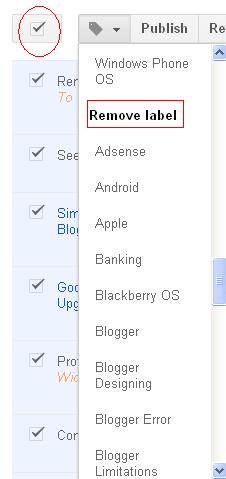
2. Go to Posts > Select all the posts. Follow the picture:
3. Under the "Remove label" section, you can select the label which you can to remove for the posts.
You are done!!! You have already removed multiple posts at one shot.


Thanks for reading this tutorial.

MS Office vs. Quickoffice: BYOD could win the battle


The purchase of Quickoffice by Google is a brilliant move to compete with Microsoft and the imminent launch of Windows 8. Microsoft has an advantage with the Office brand, and Windows 8 will bring it to the tablet in an official way. Google has to do something to compete with mobile Office, and Quickoffice is a good start.

Quickoffice isn't Microsoft Office but it can work with Word, Excel, and Powerpoint documents so well that for many it's just as good. It doesn't match Office apps feature for feature, but it does handle most Office documents nicely. In addition to editing Office documents, Quickoffice also outputs files in Office formats. In many cases documents created/edited by Quickoffice are indistinguishable from those coming from actual Office apps.

Google knows that the Office brand is a big advantage for Microsoft, something that will be used to full benefit with Windows 8. Even Windows RT will come with a subset of Office apps installed, kind of a Quickoffice for Windows. It won't be surprising if Google integrates Quickoffice into the very core of Android, leveraging the purchase for the platform. It will almost certainly be tightly integrated with Google Drive, the cloud repository for Google Docs.

The upcoming battle between Office and Quickoffice will be interesting to watch, and the bring your own device (BYOD) movement may play a big role in the tussle. More tablets, phones, and laptops are coming to the workplace through individual purchases, aka BYOD, and the ability to work with Office docs could be key.

If Microsoft wants to see Windows 8/RT hit the ground running, the BYOD crowd could be vital to see that happen. A case could be made that Windows will work better with corporate systems than Android or iOS. An even better case would exist if Microsoft could convince the enterprise that genuine Office should be required for BYOD programs.

This shouldn't attract the anti-trust people as Microsoft wouldn't be directly forcing anyone's hand to use genuine Office. It just needs to convince corporations that only real Office will do and let them do the stiff-arm tactics. If BYOD programs start requiring Office on devices that workers bring to the office, Windows 8 will have a tremendous advantage.

This depends on whether Microsoft brings out Office for Android or the iPad as rumors constantly indicate. While that would make business sense for the Office business unit, the Windows BU would be much better off if Office sticks to Windows 8, at least until Windows 8 get going. If that happens the growing BYOD movement could help move Windows 8 right from launch, and Office could be a big reason.

Thursday, May 31, 2012

E.U. court rules programming languages not copyrightable

The highest court in the European Union issued a ruling on Wednesday that essentially declares programming languages are not copyrightable.

The European Court of Justice ruled in favor of World Programming Limited (WPL) over the SAS Institute, which developed the SAS System, an integrated set of programs that enables users to carry out data processing and analysis tasks.

WPL emulated these functionalities with its World Programming System to ensure that its platform would work the same way, meaning the same inputs would produce the same outputs.

Here are the most important parts of the ruling, according to the court judgment:

In order to produce the WPS program, WPL lawfully acquired copies of the Learning Edition of the SAS System, which were supplied under licences limiting the rights of the licensee to non- production purposes. WPL used and studied those programs in order to understand their functioning but there is nothing to suggest that WPL had access to or copied the source code of the SAS components.

And:

Thus, only the expression of those ideas and principles is protected by copyright. The object of the protection conferred by Directive 91/250 is the expression in any form of a computer program, such as the source code and the object code, which permits reproduction in different computer languages. On the basis of those considerations, the Court holds that neither the functionality of a computer program nor the programming language and the format of data files used in a computer program in order to exploit certain of its functions constitute a form of expression. Accordingly, they do not enjoy copyright protection.

For anyone following along to the Oracle v. Google case, the similarities are spellbinding.

In the U.S. parallel at the U.S. District Court, the jury is currently deliberating over whether or not Google is guilty of copyright infringement for using a specific 37 Java APIs on Android without a license.

Google believes that because the Java language is free to use, so should the APIs because they are necessary for making the Java language work.

On the contrary, Oracle — the owner of the Java APIs and related patents and copyrights after its 2010 acquisition of Sun Microsystems – argues that Google took these APIs without a license because they were the most popular and would speed up the process to debut Android back in 2007.

Nevertheless, there are some key differences here between Oracle v. Google and SAS v. WPL — especially regarding source codes, which are at the heart of Oracle's case.

Groklaw points towards a Google+ discussion that highlights that while WPL didn't have access to SAS's source code, but the Java source code was available through Apache Harmony. Oracle has played up the latter quite a bit, although Google denies it copied the source code.

It's also worth pointing out that even if SAS v. WPL had been decided sooner, it wouldn't necessarily affect the Oracle-Google trial due to jurisdiction. The WPL case would only hold in Europe, while Oracle v. Google is being tried in an American federal court.

Wednesday, May 30, 2012

All You Need To Know About Cloud Computing : Explained In Simple Words

It's the next big trend, the next big thing and the next big buzz : Cloud Computing. I know, you must be hearing this word every now and then when you browse through the internet and you might have tried finding out what exactly it is, right? Couldn't understand yet? Well, that is why I'm here for. Today, I'm going to explain you what is cloud computing in simple words which I'm sure will explain everything about Cloud Computing.

Wikipedia Definition of Cloud Computing is : Cloud computing is the delivery of computing as a service rather than a product, whereby shared resources, software, and information are provided to computers and other devices as a utility (like the electricity grid) over a network (typically the Internet).

You might find tough time what all these means. Never mind, keep reading this article and I am sure you will have a clear idea about this whole Cloud Computing thing when it is over.

what is cloud computing All You Need to Know About Cloud Computing : Explained in Simple Words

What is Cloud Computing?


Cloud computing is the ability to employ a number of computers, hardware, software, and servers to serve your computing needs remotely without actually owning or running the software and hardware.

Cloud computing comes into focus only when you think about what IT always needs: a way to increase capacity or add capabilities on the fly without investing in new infrastructure, training new personnel, or licensing new software. Cloud computing encompasses any subscription-based or pay-per-use service that, in real time over the Internet, extends IT's existing capabilities.

You might not experience but when you access your Gmail or HotMail or Yahoo Mail, it is all running on cloud service. In short, the Cloud Computing power is infinite.


Characteristics of Cloud Computing

  • On demand self services : computer services such as email, applications, network or
    server service can be provided without requiring human interaction with each service
    provider.
  • Rapid elasticity: Cloud services can be rapidly and elastically provisioned, in some cases
    automatically, to quickly scale out and rapidly released to quickly scale in.
  • Measured service: Cloud computing resource usage can be measured, controlled, and
    reported providing transparency for both the provider and consumer of the utilised service.
  • Self Healing : In case of a system failure, the last saved copy of an application becomes the primary copy.
  • In cloud computing, it is not possible to know where actually your data is physically present.

Benefits/Advantages of Cloud Computing

  • Reduced costs : Cloud computing reduces your hardware (computers, software (all those downloaded programs), networking management and overall IT expenses. In addition, with cloud computing, you pay for what you use.
  • Automatic Updates : There is no need for a user to worry about paying for your future updates in terms of software and hardware.
  • More Mobility : Employees can access information wherever they are, rather than having to remain at their desks.
  • Response Time: Cloud computing accomplishes a better response time in most cases than your standard server and hardware.

Cloud Computing is like a machine with unlimited resource that runs 24 hours and 7 days a week and all those resources are shared.

Negatives of Cloud Computing

  • Internet Use : It's necessary to stay connected to Internet to be able to use cloud computing service as the data is stored on the cloud and internet is necessary to connect to cloud servers.
  • Public Data : If the Cloud server is not private, it makes all the user data public which means, anyone can access the data stored in a cloud server if it isn't a private cloud.

In short, you just lose control over your data if it is not stored in a private cloud.

Examples of Cloud Computing

  • All Google Apps including Gmail, Picasa, Google Docs, Google Play (Android Market)
  • Amazon Web Services (AWS)
  • Microsoft Zune & Azure, Apple's iTunes
  • Cloud Hosting Services

So, that's it for now. It was indeed a long read but I hope it was worth the time and you got a basic knowledge of what Cloud Computing is all about. Let me know if you have any queries in comments below or leave a word of appreciation at least. Thanks a lot. Cheers till the next time I see you with another amazing article.


Common Passwords Mistakes And How To Avoid Them

How many passwords do you have to key-in throughout the day? There are times when you have to key-in a number of passwords – from various websites to your office and home computers to even your ATM and mobile device(s). Businesses large and small rely heavily on their passwords to prevent sensitive data from being hacked. Having a poorly created password may leave you vulnerable to identity theft, financial loss and what not. We often come across embarrasing news of hackers breaking into some celebrity's account and posting fake information.

These sort of accidents just don't happen with celebrities only. They happen to people like you and me. Getting a complex password is the best way out.
maxinepassword Common Passwords Mistakes and How to Avoid Them

Never forget the most important passwords!

Mistakes

Location – Creating a post-it of the password of your account and 'hiding' it under the keyboard is equal to keeping no passwords at all! A convenient way out is by memorizing a password and noting it down on a place (mobile phone?) which is even password-protected.

Complexity – Short and simple passwords are easy to hack into. There are a number of us who often provide small passwords which can be easily guessed by hackers. "albert' "12345″ just isn't right!

Common words – Hackers normally begin with dictionaries in English and other languages when trying to guess your password. They first run the combinations of the most common words and if you happen to have them, you are totaled!

Same Passwords for all Accounts – When you are thinking about passwords, you keep a few combination of passwords for all of your accounts. This may severely backfire! If a hacker hacks one of your accounts, then there is high chance that he/she will try it on all of your accounts.

Personal Information – The least you can do is by giving a password with your personal information. Address, Spouse name, Social security number are a strict no-no. Pet names and nick names are also a strict no-no.

Not updating passwords – There are many of us who simply haven't updated their passwords since the time they have created their accounts. One needs to update the passwords every 60 days or so.

Solution

Here are the tips to create passwords which will never give away. Have a look!

Idea 1  -

  • Create a password by first remembering a sentence. (I love my India)
  • Follow it up by removing spaces. (IlovemyIndia)
  • Then turn the words in shorthand, numbers and others. (ilovemyindya)
  • End the newly formed sentence with four digits which are of significance to you. (il0vemyindya1988)

This is just an example. Be free to experiment with longer sentences.

More ideas -

While the above idea may sound easy, some of these idea may be a bit tough. But remember, it's all about creating a strong account, isn't it?

  • Choose two words and join them with any number or symbol. For example – Lovely&twitter
  • Create a sequence of your family members' names and their age but just use the first two letters. For example –  (Sam,Helen,David,Scott) (59,57,12,20) – Sa59He57Da12Sc20
  • Remove vowels from your long sentence and replace them with numbers. For example – IwantaMercedes – 1w5n0t5M1rc9d8s8 (The numbers are birthday)
While the above were ways and means to create a strong password, it shouldn't be too much of asking if you follow the below mentioned points as well -
  • Never give anyone your password – Be it your spouse, children or anyone else, giving your password just isn't the right idea.
  • Never store your password in the browser, more so if it's a public computer. A no-brainer.
  • If you can't do without writing it down somewhere, be sure to keep it in a hidden place and once you memorize it, don't just toss it in the bin, shred the note and!
  • No matter how important the mail looks, never send across your password in an e-mail.
These are definitely not the sole guidelines for you to follow. You can create your own methods for that perfect password as well! So, how do you create a strong password? Share it in the comments below!

Google Announces Google Drive : Pass Or Fail?

Google Drive, the most talked tech rumor since 2006 has been finally revealed today. It's a new cloud-based online storage application by Google which aims at simplicity to share and allow users to store their content freely. A place where you can create, share, collaborate and keep all your stuff. Whether you're working with a friend, or on a research project or anything else, you can do it on Drive. You can upload all of your files including photos, videos, Google Docs, PDF's and much more. It's actually a new home for all your files and folders. You can access your data from anywhere whether it's Windows, Android on Google Play or even Mac OS.

gdr1 1024x573 Google Announces Google Drive : Pass Or Fail?

Well, setting up Google Drive is a "make a new folder" job, you just need to godrive.google.com/start and sign in with your preferred Google account. Then you need to Download Google Drive For PC and as soon as it's installed a new folder "Google Drive" will be created where you can start storing your files and folders. Drive will sync your files when you add to the folder, it takes about 2-3min to upload 35MB of data which is quick enough. You can have feedback on your files via comments and can even reply them. You can share your files and folders with your friends just by providing them the link or changing the sharing settings to "Public".

gdrrii3 1024x344 Google Announces Google Drive : Pass Or Fail?

Things about Google Drive which could Challenge other Cloud Services :

  1. Google Drive Offers 5GB of free storage to all the users at start which is twice more than Dropbox's 2GB storage.
  2. The memory of the files saved as Google Docs will not be counted in the free 5GB storage provided.
  3. You can directly share your files with anyone on the web by changing the 'Sharing Settings' to Public, Anyone with the link or only to specific persons unlike creating a Shared Folder in Dropbox.
  4. Google Drive has the best pricing schemes for extra storage, it charges only $2.5/month for 25GB extra and $4.99 for 100GB extra storage and even for 1TB it charges just $49.99/month.
  5. Since Drive is an open platform, they are also working on third-party apps like Pixlr will offer an online image editor, WeVideo offers online video editing, Docusign let's users sign documents and Hellofax allows to send and receive Google Drive files as faxes.

Google Drive isn't yet available for Linux as far as we know. But it's certainly available for Windows, Mac and Android. You can download the official Google Drive app for Android devices and tablets from HERE.

UPDATE : Soon after Google Drive's launch yesterday, the Chinese government has blocked access to Google's new cloud storage service. So the Chinese people can neither use Dropbox nor Google Drive. This will obviously allow the local services like Baidu's Wangpan cloud storage service to dominate. It also provides 25GB of free storage to all the users which is much more than the combined figure of Dropbox and Google Drive and can be even increased further for free through some initiatives.

Tuesday, May 29, 2012

Vivekananda Quote


Today's Vivekananda Quote


SwamijiThere is no possibility of ever having pleasure without pain, or good without evil. For living itself is just the lost equilibrium. What we want is freedom, not life, nor pleasure, nor good.


Retreat given at the Thousand Island Park, USA. June 25, 1895. Complete Works, 7.12.

Vedanta 101
Introductory Lectures On
Vedanta and the Gita
by Swami Tyagananda

Audio CD $ 4.99 Order Now
Download $ 2.99 Download Now

Vedanta Society

About Us
The Daily Quotes of Swami Vivekananda is a free service offered by the Ramakrishna Vedanta Society and is maintained through voluntary contributions made by friends and readers like you. To contribute,

Monday, May 28, 2012

Sexual Harassment at Technical Conferences: A Big No-No

We've been contacted recently about issues of sexual harassment at technical conferences, including at Oscon, which starts tomorrow in Portland. At O'Reilly we take those issues very seriously. While we're still trying to understand exactly what might have happened at Oscon or other O'Reilly conferences in the past, it's become clear that this is a real, long-standing issue in the technical community. And we do know this: we don't condone harassment or offensive behavior, at our conferences or anywhere. It's counter to our company values. More importantly, it's counter to our values as human beings. 

We're voicing our strong, unequivocal support of appropriate behavior by all participants at technical events, including Oscon and other O'Reilly conferences. We invite you to help us make Oscon a place that is welcoming and respectful to all participants, so everyone can focus on the conference itself, and the great networking and community richness that can happen when we get together in person.

One issue that has come up at some technical conferences is sexual or racist comments or images in slides. This is not appropriate. Speakers and exhibitors should use good judgment; if we hear complaints and we think they are warranted, you may not be invited back.

Even more alarmingly, we've heard accounts of female attendees having to put up with stalking, offensive comments, and unwanted sexual advances. I'd like to borrow a line from the Flickr Community Guidelines, which use the term Creepiness as follows: "You know that guy. Don't be that guy." If we hear that you are that guy, we will investigate, and you may be asked to leave.

Please bring any concerns to the immediate attention of the event staff, or contact our VP of Conferences, Gina Blaber at gina@oreilly.com. We thank our attendees for their help in keeping the event welcoming, respectful, and friendly to all participants.

P.S. We are going to adapt this blog post into a "Code of Conduct" that will become part of the web site registration materials for all of our conferences.


Hadoop: What it is, how it works, and what it can do


HadoopHadoop gets a lot of buzz these days in database and content management circles, but many people in the industry still don't really know what it is and or how it can be best applied.

Cloudera CEO and Strata speaker Mike Olson, whose company offers an enterprise distribution of Hadoop and contributes to the project, discusses Hadoop's background and its applications in the following interview.

Where did Hadoop come from?

Mike OlsonMike Olson: The underlying technology was invented by Google back in their earlier days so they could usefully index all the rich textural and structural information they were collecting, and then present meaningful and actionable results to users. There was nothing on the market that would let them do that, so they built their own platform. Google's innovations were incorporated intoNutch, an open source project, and Hadoop was later spun-off from that. Yahoo has played a key role developing Hadoop for enterprise applications.

What problems can Hadoop solve?

Mike Olson: The Hadoop platform was designed to solve problems where you have a lot of data — perhaps a mixture of complex and structured data — and it doesn't fit nicely into tables. It's for situations where you want to run analytics that are deep and computationally extensive, like clustering and targeting. That's exactly what Google was doing when it was indexing the web and examining user behavior to improve performance algorithms.

Hadoop applies to a bunch of markets. In finance, if you want to do accurate portfolio evaluation and risk analysis, you can build sophisticated models that are hard to jam into a database engine. But Hadoop can handle it. In online retail, if you want to deliver better search answers to your customers so they're more likely to buy the thing you show them, that sort of problem is well addressed by the platform Google built. Those are just a few examples.

How is Hadoop architected?

Mike Olson: Hadoop is designed to run on a large number of machines that don't share any memory or disks. That means you can buy a whole bunch of commodity servers, slap them in a rack, and run the Hadoop software on each one. When you want to load all of your organization's data into Hadoop, what the software does is bust that data into pieces that it then spreads across your different servers. There's no one place where you go to talk to all of your data; Hadoop keeps track of where the data resides. And because there are multiple copy stores, data stored on a server that goes offline or dies can be automatically replicated from a known good copy.

In a centralized database system, you've got one big disk connected to four or eight or 16 big processors. But that is as much horsepower as you can bring to bear. In a Hadoop cluster, every one of those servers has two or four or eight CPUs. You can run your indexing job by sending your code to each of the dozens of servers in your cluster, and each server operates on its own little piece of the data. Results are then delivered back to you in a unified whole. That's MapReduce: you map the operation out to all of those servers and then you reduce the results back into a single result set.

Architecturally, the reason you're able to deal with lots of data is because Hadoop spreads it out. And the reason you're able to ask complicated computational questions is because you've got all of these processors, working in parallel, harnessed together.

At this point, do companies need to develop their own Hadoop applications?

Mike Olson: It's fair to say that a current Hadoop adopter must be more sophisticated than a relational database adopter. There are not that many "shrink wrapped" applications today that you can get right out of the box and run on your Hadoop processor. It's similar to the early '80s when Ingres and IBM were selling their database engines and people often had to write applications locally to operate on the data.

That said, you can develop applications in a lot of different languages that run on the Hadoop framework. The developer tools and interfaces are pretty simple. Some of our partners — Informatica is a good example — have ported their tools so that they're able to talk to data stored in a Hadoop cluster using Hadoop APIs. There are specialist vendors that are up and coming, and there are also a couple of general process query tools: a version of SQL that lets you interact with data stored on a Hadoop cluster, and Pig, a language developed by Yahoo that allows for data flow and data transformation operations on a Hadoop cluster.

Hadoop's deployment is a bit tricky at this stage, but the vendors are moving quickly to create applications that solve these problems. I expect to see more of the shrink-wrapped apps appearing over the next couple of years.

Where do you stand in the SQL vs NoSQL debate?

Mike Olson: I'm a deep believer in relational databases and in SQL. I think the language is awesome and the products are incredible.

I hate the term "NoSQL." It was invented to create cachet around a bunch of different projects, each of which has different properties and behaves in different ways. The real question is, what problems are you solving? That's what matters to users.

Search This Blog